
2 - Prerequisites
The Prerequisites page checks that this computer has everything Nexus PLM needs before anything is installed. Each row is a tick, an amber warning or a red cross with a short explanation. Red rows must be fixed before you can continue; amber rows only tell you what will not be available if you carry on.
Setup checks that you are running as an administrator, that the Windows version is supported, that there is enough free disk space, that the ASP.NET Core runtime is present, that the ports the services need are free, whether Nexus PLM services from an earlier installation already exist, and whether FreeCAD and LibreOffice are installed for document conversion.
If the ASP.NET Core runtime row is red, press Install now. Setup runs the Microsoft installer that is shipped inside this package, so nothing is downloaded, and re-checks the row when it finishes. After fixing anything outside Setup - freeing a port, freeing disk space, installing FreeCAD - press Re-check.
When no row shows a red cross, press Next.
Common fixes:
If you are not an administrator, close Setup, right-click it and choose Run as administrator.
If a port is in use, either stop the program using it or give that service a different port on the Topology page. FreeCAD and LibreOffice missing is only a warning - everything works except conversion of CAD and office documents, and you can install them later.
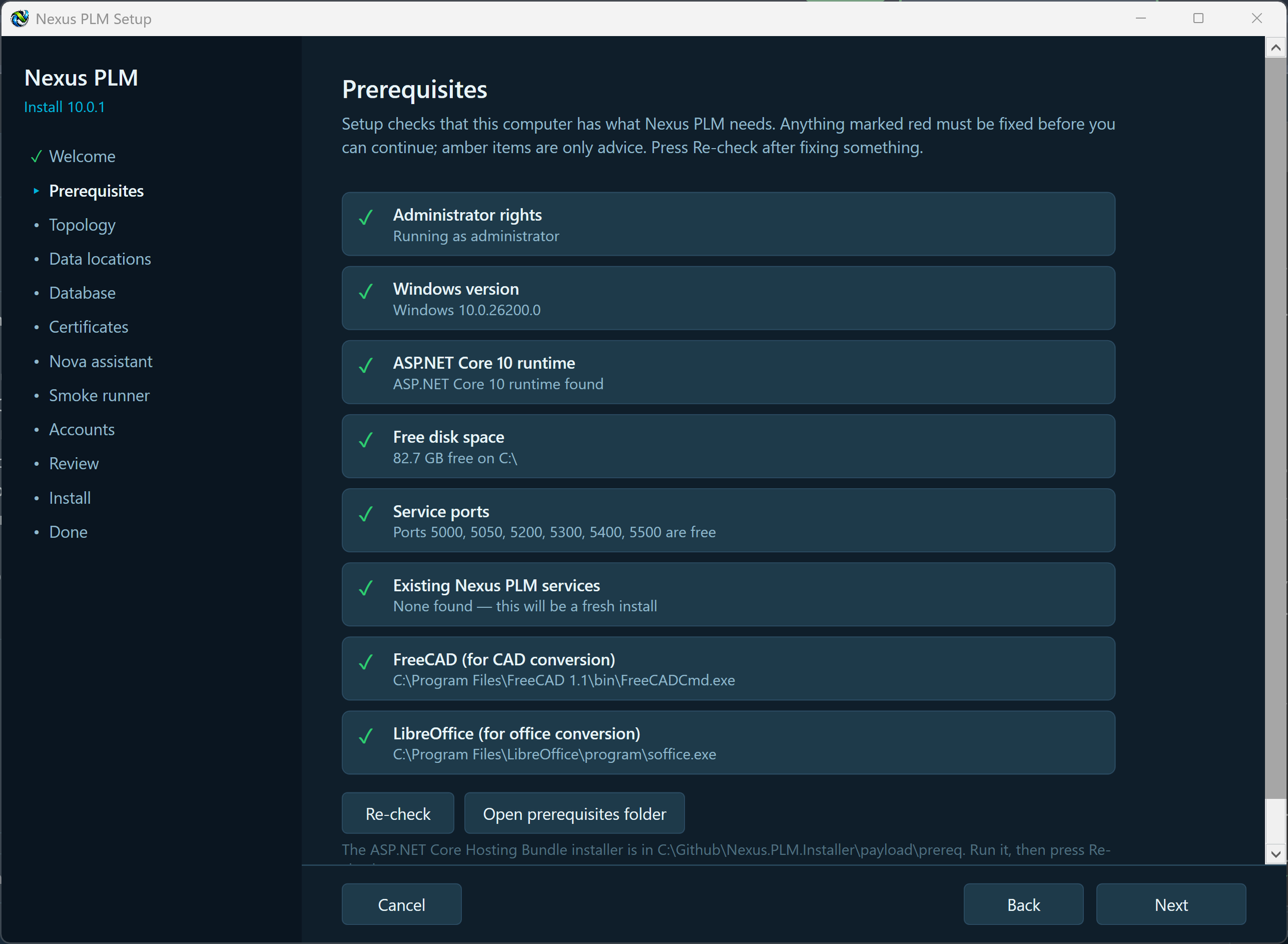
Installation Prerequisites
