
Background
Nova is a conversational layer over your live PLM data. You ask in plain language — "how many parts do we have?", "where is NX00000003 used?", "how do I reset an image?" — and Nova answers from the actual database, through the same permissions your account has. It is read-only by construction: it can look anything up, and it can modify nothing.
What makes Nova different from a chatbot bolted onto a search box is grounding: every answer is written from objects Nova actually retrieved, those objects are shown to you beside the conversation, and for hard facts — counts, attribute values, help procedures — Nova quotes the stored data verbatim rather than paraphrasing it.
Grounded, not guessed
When you ask a question, Nova first retrieves the PLM objects that could answer it, then writes the answer from them. Everything it retrieved lands in the Found panel on the right — not just what the answer quoted. That is deliberate: when an answer is thin or wrong, seeing what Nova had to work with is the most useful thing on the screen.
Why it matters to Nexus: an ungrounded assistant that invents a plausible part number or a plausible procedure is worse than no assistant. Nova cites real objects you can open with one click, answers "how do I…" questions only from this help library, and is explicitly instructed never to invent steps, buttons or shortcuts that the documentation does not contain. If the library does not cover something, a vague answer is the honest signal that it doesn't.
Exact answers for exact questions
For questions with one right answer, Nova skips the language model entirely and answers deterministically from the data:
Counts — "how many parts do we have?" returns "There are exactly N…" with a per-type breakdown. The number is a database count, not an estimate.
Attribute lookups — "what is Steven Blaire's email?" returns the stored value verbatim. When the question is ambiguous (two Stevens), Nova says so and lists the candidates instead of picking one.
Your own work — "what are my tasks?", "what have I changed recently?" and "what do I have checked out?" answer from the signed-in account itself — never from a name in the conversation, so they cannot be pointed at anyone else's work.
The data model — "show me the data model" or "what types do we have?" surveys the real type registry (add a family to narrow it: "just the part types"); "what fields does a Part have?" describes one type in full.
Help procedures — a confident match against a help-article section returns that section's own text, word for word, introduced as From "article" — section: with a link that opens the Help reader at exactly that heading.
These answers arrive near-instantly — there is no model in the loop to be slow or creative. Softer questions (comparisons, summaries, "tell me about…") still go through the model, written over the retrieved objects.
Nova answering a count question with an exact number and a per-type breakdown
Step by step: ask well
Open AI Assistant and just ask, in your own words. Part numbers help — "tell me more about NX00000012" is unambiguous.
Enter sends; Shift+Enter makes a newline. The answer streams in as Nova writes it, and the retrieved objects appear in the Found panel before the first word.
Follow up naturally — Nova keeps the conversation's context, so "and its email?" works after a question about a person.
Open anything from the Found panel with a click, or right-click a row to dig deeper without typing.
For product guidance, ask "how do I…" — the answer quotes the help library and links the exact section, and a 📖 Read more in Help footer takes you to the full article.
The AI Assistant screen, item by item
The conversation
A standard chat: your messages on the right under your avatar (the same initials and colour as the top bar), Nova's on the left. The input box is disabled while Nova is answering and focus returns to it the moment the answer finishes, so a conversation flows without reaching for the mouse. If the assistant service is unreachable, the answer bubble says so plainly instead of hanging.
Links inside answers are live. Links that point back into this client — a help section, an object deep link — navigate in the app, no page reload; anything external opens in a new tab.
The "n found" chip
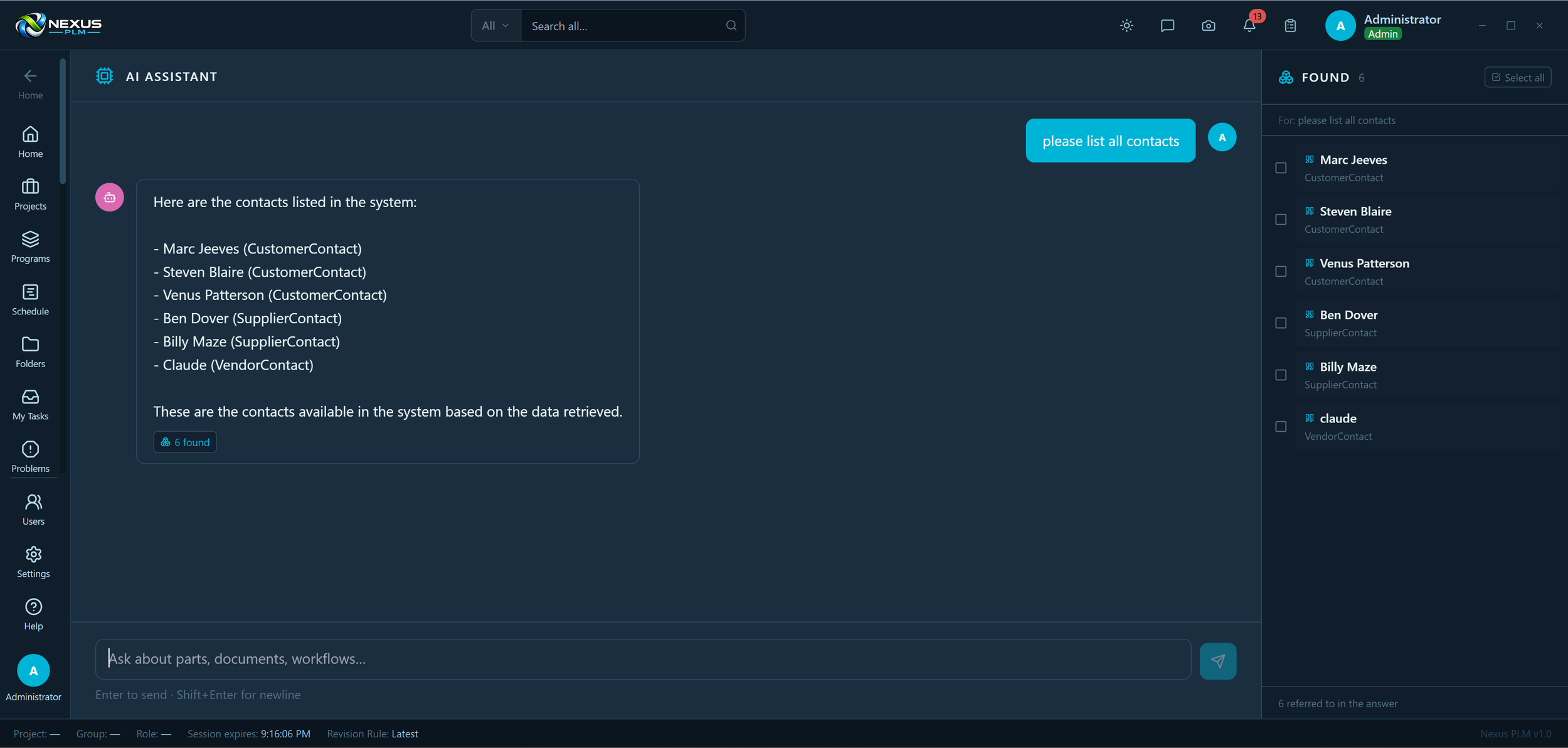
Every answer that retrieved objects carries a small n found chip. The Found panel normally follows the newest answer, but clicking an earlier answer's chip pins that turn's results back into the panel — so a follow-up question never costs you the list of parts you were just looking at. Asking something new unpins automatically.
The Found panel
The right-hand panel lists everything Nova retrieved while answering, cited objects first — each row the answer actually referred to is marked with a quote glyph, and the rest sit under an "Also retrieved" divider. The header shows which question produced the list ("For: …") and a Pinned badge with an × when you are viewing an earlier turn. The footer counts how many objects the answer referred to.
Clicking a row opens the object: help articles open in the Help reader — at the exact answering section when Nova knows it — and everything else opens in object detail.
The Found panel: the For: header naming the question, above the objects Nova grounded its answer in
The dig-deeper radial
Right-click any found row (or click its hover bot button) for a radial menu of canned follow-ups about that object:
More — "Tell me more about …"
Related — "What objects are related to …?"
Similar — "Find objects similar to …"
Where used — "Where is … used?"
Changes — "What has changed recently on …?"
Each one is sent through the chat exactly as if you had typed it — the answer streams into the conversation and its own results land in the panel, so a dig-deeper is a full turn, not a side channel. The menu also offers Open and Copy: Copy puts the object on the PLM clipboard — the top-bar stack every add-panel pastes from — with its default revision resolved, and drops the part number onto your OS clipboard as a bonus. The dig-deeper items wait politely while Nova is mid-answer.
The dig-deeper radial on a found object — More, Related, Similar, Where used, Changes, plus Open and Copy
Ask Nova from anywhere
You do not have to start here. Object rows in Folders and both search pages carry an Ask Nova entry in their radial menus — it opens this page with the question already asked. The help reader can hand questions over the same way.
What Nova will not do
Modify data. There is no write path — asking it to change a status will get you directions to the right app, not a change.
Show you objects your account cannot see. Retrieval runs under your permissions, so Nova's answers are exactly as visible as your searches.
Invent procedures. "How do I" answers come from the help library or not at all.
Use case
A designer inherits an unfamiliar assembly. "Tell me more about NX00000003" — description, status, revision history, and the part itself in the Found panel. Right-click → Where used: three parent assemblies, all listed and openable. "What has changed recently on it?" surfaces last month's ECO. Then "how do I create a new revision?" quotes the exact steps from the help library with a link into the article. Ten minutes of orientation that used to be an afternoon of asking around — and every claim came with the object or article behind it.
Tips
Use part numbers when you have them — they anchor the question to exactly one object.
Trust the exact answers, check the soft ones: counts and attribute values are database reads; summaries are prose over retrievals — the Found panel shows you the sources either way.
Pin before you wander. About to ask a tangent? Click the current answer's "n found" chip first and the results stay reachable.
An empty or thin Found panel explains a weak answer — refine the question rather than arguing with the prose.
You can tell Nova preferences to remember — "remember that I prefer metric" — and review or clear them later.